
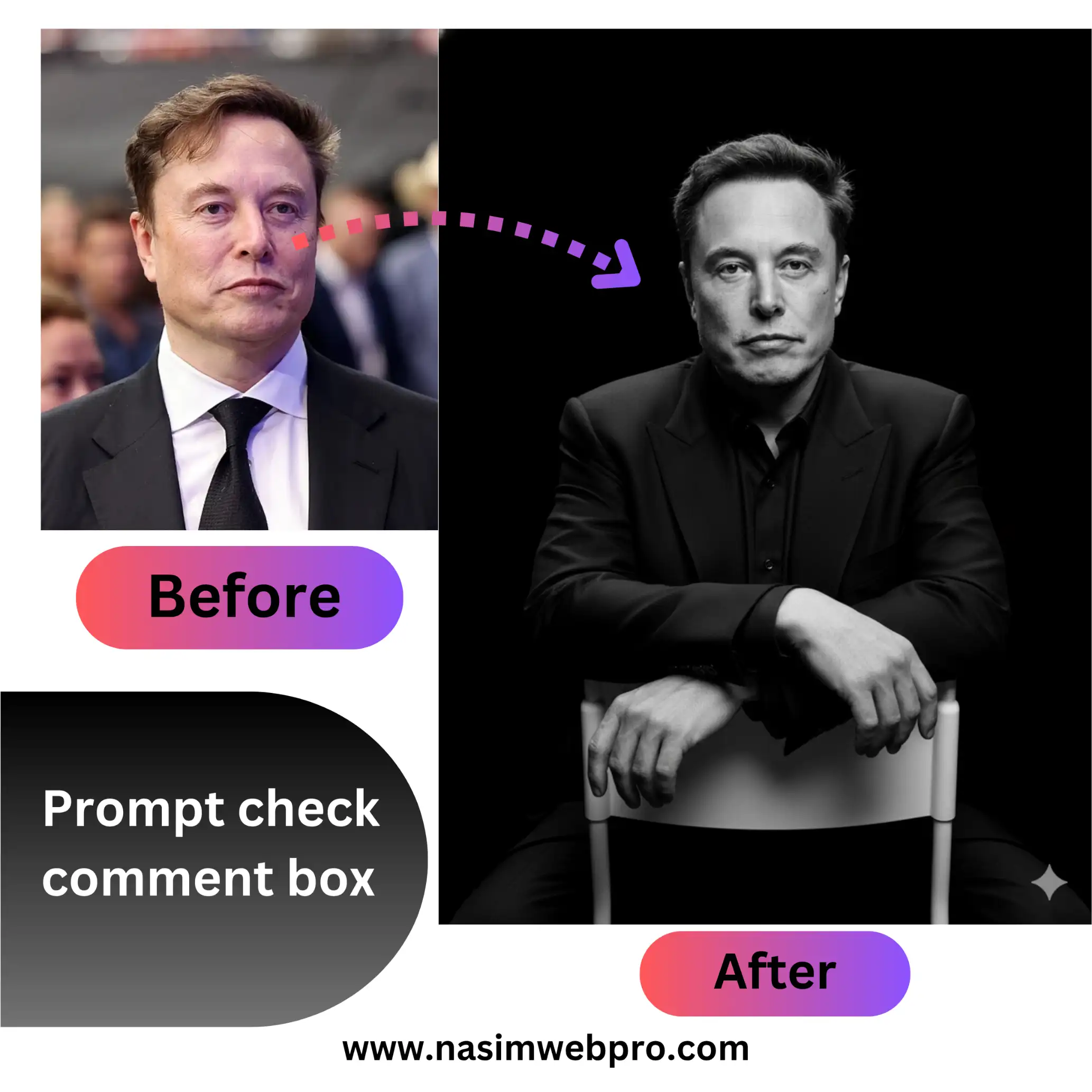
Have you ever wondered how to achieve that dramatic, high-fashion black and white studio portrait look, like the recent one of Elon Musk that’s been making waves? What if I told you that you could generate similar stunning images from your existing photos, without needing a professional studio or complex editing software?
Prompt Below
Ultra-realistic studio portrait of a man leaning gracefully on the backrest of a chair, dressed in a sleek dark outfit. Shot from a subtle low-angle to accentuate her facial features and confident expression. Cinematic black-and-white color grade with refined, natural skin tones. Solid black background with sharp 8K details, highlighting textures in her clothing, hair, and eyes for a dramatic, lifelike effect using reference image without face change make it pixel perfect.
The secret lies in advanced AI image generation technology!
The Power of AI in Photography
Artificial intelligence is revolutionizing the world of photography, making professional-grade effects accessible to everyone. Tools powered by AI can analyze your existing images and apply sophisticated transformations, understanding nuances of lighting, texture, and style. This means you can take a regular photo and elevate it to a cinematic masterpiece with just a few prompts.

Prompt Below
I am standing in a modern studio environment, leaning casually against a large white sculptural object in the shape of the word TRUMP. My body is captured from the side, with my weight resting mostly on one leg in a relaxed but confident stance. Both of my hands are placed casually in the pockets of my trousers, reinforcing the effortless posture. My head is slightly tilted downward as I glance calmly past the frame, maintaining a composed and introspective expression.I am wearing a black crew-neck sweatshirt with a relaxed fit, made of soft cotton fabric with no logos or patterns. I pair it with black jogger-style trousers, loose-fitting with elastic cuffs at the ankles. On my feet, I wear chunky black-and-white sneakers with visible laces and a bold sole, adding a sporty edge to the minimal outfit. The overall style is monochrome, minimalistic, and contemporary streetwear.The image is captured from a low angle shot, emphasizing height and presence, while also making the sculptural letters of CHRIS appear monumental in the background. The camera framing resembles a portrait lens around 85mm focal length, producing cinematic compression and natural proportions.
The lighting is controlled studio light, evenly highlighting my figure while casting soft, directional shadows on the sculptural letters behind me. The background is a gradient of dark grey, clean and minimal, contrasting with the bold white typography.The overall mood is cinematic, editorial, and modern, blending casual streetwear fashion with bold architectural typography in a dramatic low-angle perspective.
note please use my uploaded reference photo face as pixel perfect.
How to Generate Your Own “Cinematic Black & White Studio Portrait”
If you’re looking to create images like the “Cinematic Black & White Studio portrait of Elon Musk,” here’s a breakdown of the process and what makes these AI-generated images so compelling:
1. The Reference Image: Your Starting Point
The magic begins with a good quality reference image. While AI can do wonders, starting with a clear, well-lit photograph will yield the best results. For example, if you want a portrait of yourself in this style, provide a frontal or slightly angled headshot.
2. Crafting the Prompt: Guiding the AI
This is where you tell the AI exactly what you envision. The more descriptive and precise your prompt, the better the outcome. Let’s break down the elements of the prompt used for the Elon Musk image and why they are effective:
- “Ultra-realistic studio portrait of a man leaning gracefully on the backrest of a chair, dressed in a sleek dark outfit.”
- “Ultra-realistic”: This keyword pushes the AI to generate an image that looks like a photograph, not an illustration.
- “studio portrait”: Sets the scene and lighting style.
- “leaning gracefully on the backrest of a chair”: Dictates the pose, adding a sense of sophistication and confidence.
- “dressed in a sleek dark outfit”: Specifies the attire, contributing to the overall elegant and dramatic aesthetic.
- “Shot from a subtle low-angle to accentuate her facial features and confident expression.”
- “subtle low-angle”: This camera perspective is often used in cinematic photography to make the subject appear powerful and imposing.
- “accentuate her facial features and confident expression”: Guides the AI to focus on the subject’s face, ensuring clarity and capturing a specific mood.
- “Cinematic black-and-white color grade with refined, natural skin tones.”
- “Cinematic black-and-white color grade”: This is crucial. It requests the classic, dramatic monochrome look often seen in films, emphasizing contrasts and shadows.
- “refined, natural skin tones”: Even in black and white, the texture and quality of skin are important for realism. This ensures the subject doesn’t look flat or overly retouched.
- “Solid black background with sharp 8K details, highlighting textures in her clothing, hair, and eyes for a dramatic, lifelike effect using reference image without face change make it pixel perfect.”
- “Solid black background”: A classic choice for studio portraits, as it isolates the subject and enhances drama.
- “sharp 8K details, highlighting textures in her clothing, hair, and eyes”: This pushes for extremely high resolution and emphasizes intricate details, which is key to an “ultra-realistic” and “lifelike” effect.
- “dramatic, lifelike effect”: Reinforces the overall desired mood and quality.
- “using reference image without face change”: This is a critical instruction. It tells the AI to use the facial features from your provided reference photo, ensuring the likeness is maintained. This is how you can transform your photo into this style!
- “make it pixel perfect”: A final touch to ensure the highest quality output.
Example of the Transformation (Before & After):
Imagine taking a standard, brightly lit photograph of yourself like the initial Elon Musk image. By applying the prompt above, an AI model can generate a dramatically transformed version, maintaining your likeness but placing you in a sophisticated, black-and-white studio setting.
[Here you would ideally place the before and after images of Elon Musk that were generated earlier, or a similar example if available to you for your website.]
Want to Experience This Yourself?
Many AI image generation platforms are now available online (e.g., Midjourney, DALL-E, Stable Diffusion, or specialized photo editing AIs). While the specific interface might vary, the principle remains the same: provide your image and craft a detailed prompt.
To try generating images like this and explore the possibilities of AI in photography, visit [Your Website Link Here] where we delve deeper into AI-powered creative tools and offer tutorials to help you master these exciting new techniques!